
Loan management software: set the credit up right and leave the spreadsheet
A loan is decided in a minute and administered for months. The hard part is not handing over the money: it is that months later the payment plan, the customer’s balance and what you actually earned still say the same thing. CobrApp builds the loan with its terms, generates the whole schedule and stores every payment with its split, so the three figures never drift apart.
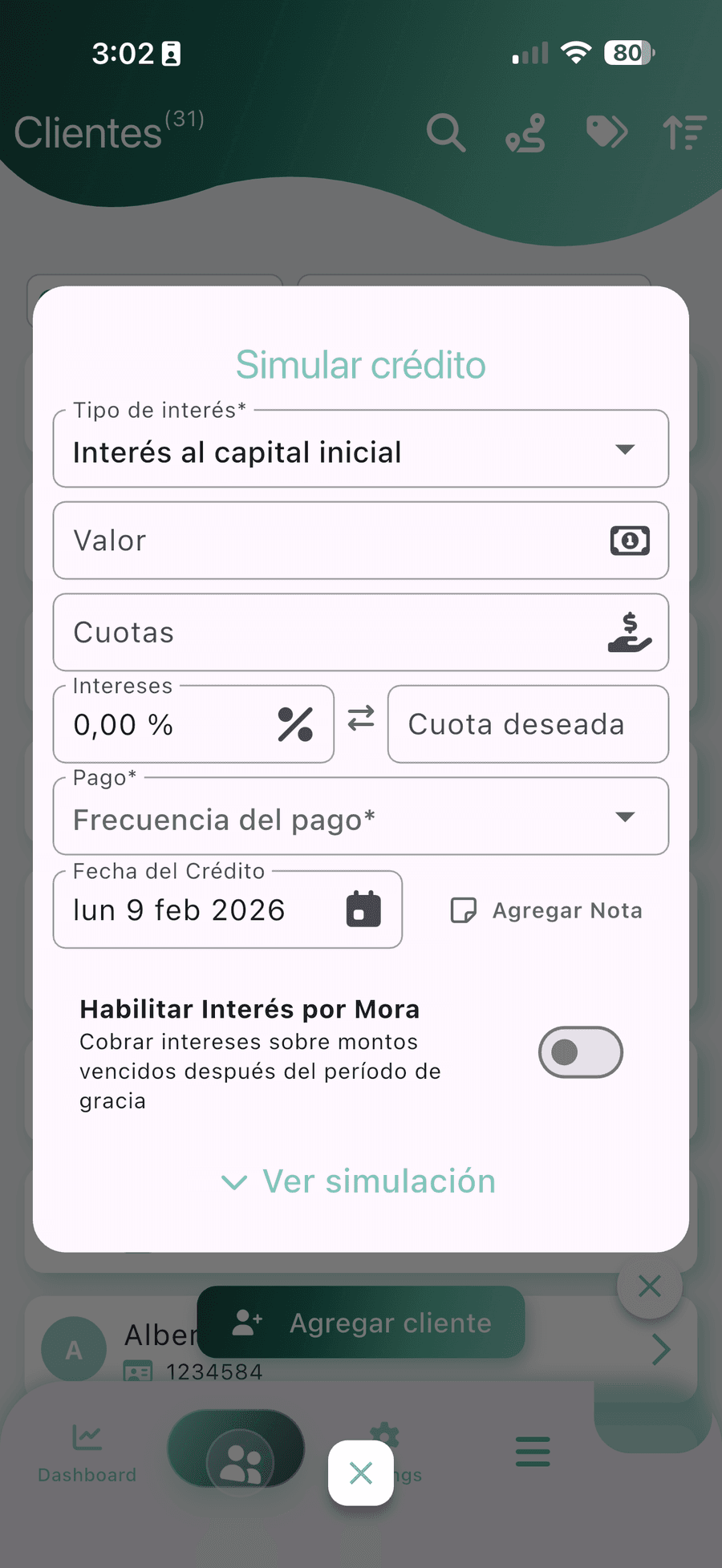
A loan is four decisions, and all four are made up front
Loan management software does not guess: it makes you write the terms once, at the start. Everything else comes out of that — the payment plan, each day’s balance, the receipt and the report. If one of the four is left half-defined, the loan is born crooked and no app straightens it later.
Capital
The money that leaves your pocket. It is the only thing you recover: when it comes back it is not profit, it is your own money returning.
Interest
The percentage and, above all, the period: 20% means nothing unless you say whether it is per month, per fortnight or for the whole term.
Term
How many installments and from what date. The disbursement day rules: every installment’s due date comes from it.
Frequency
Daily, every other day, weekly, biweekly or monthly. It defines the route and also whether the customer can pay without drowning.
The same loan, three different interest models
This is where money is lost without noticing. Lend $1,000 at 5% a month over 4 months. The rate is the same in all three cases. The total you receive is not.
| Model | How it is calculated | Total interest | Total to repay |
|---|---|---|---|
| Simple interest flat on the capital | The rate always applies to the original capital, not the balance. | $200 | $1,200 |
| Interest on the balance declining balance | Each period the rate applies only to what the customer still owes. | $125 | $1,125 |
| Compound interest the interest capitalizes | Interest that is not paid is added to the capital and generates new interest. | $215.51 | $1,215.51 |
Simple interest
This is the daily-payment model. The customer understands the arithmetic without anyone explaining it.
Interest on the balance
It rewards whoever pays fast: every capital repayment lowers the base for the next interest charge. It fits monthly loans over several months.
Compound interest
It only makes sense on loans repaid in a single payment at the end. On daily collection it penalizes too much.
The arithmetic can be redone by hand. Simple: 1,000 × 5% × 4 = 200. On the balance, repaying $250 of capital each month: 50 + 37.50 + 25 + 12.50 = 125. Compound, with no payments in between: 1,000 × 1.05⁴ = 1,215.51. That is $90.51 of difference between the most expensive and the cheapest model for the customer, with the same rate written on the note. If you want it installment by installment, it is in the guide to the loan amortization schedule.
A daily-payment loan of $1,000 over 20 installments, one by one
This is the classic daily-payment format. Capital $1,000, simple interest of 20% for the whole term, 20 daily installments Monday to Friday. The interest is 1,000 × 20% = $200. The total to collect is $1,200 and the installment, 1,200 ÷ 20 = $60. Of each installment, $50 repays capital and $10 is interest.
| Installment | Amount | To interest | To capital | Capital balance |
|---|---|---|---|---|
| 1 | $60 | $10 | $50 | $950 |
| 2 | $60 | $10 | $50 | $900 |
| 3 | $60 | $10 | $50 | $850 |
| … | … | … | … | … |
| 10 | $60 | $10 | $50 | $500 |
| … | … | … | … | … |
| 19 | $60 | $10 | $50 | $50 |
| 20 | $60 | $10 | $50 | $0 |
| Totals | $1,200 | $200 | $1,000 | — |
The totals add up: 20 × 60 = 1,200, and 1,000 of capital plus 200 of interest come to the same. That is what breaks in the notebook when the customer pays $30 instead of $60, or pays two installments together on Friday. The app simulates the loan before disbursing, generates the whole plan and updates the balance with each partial payment without rebuilding the table.
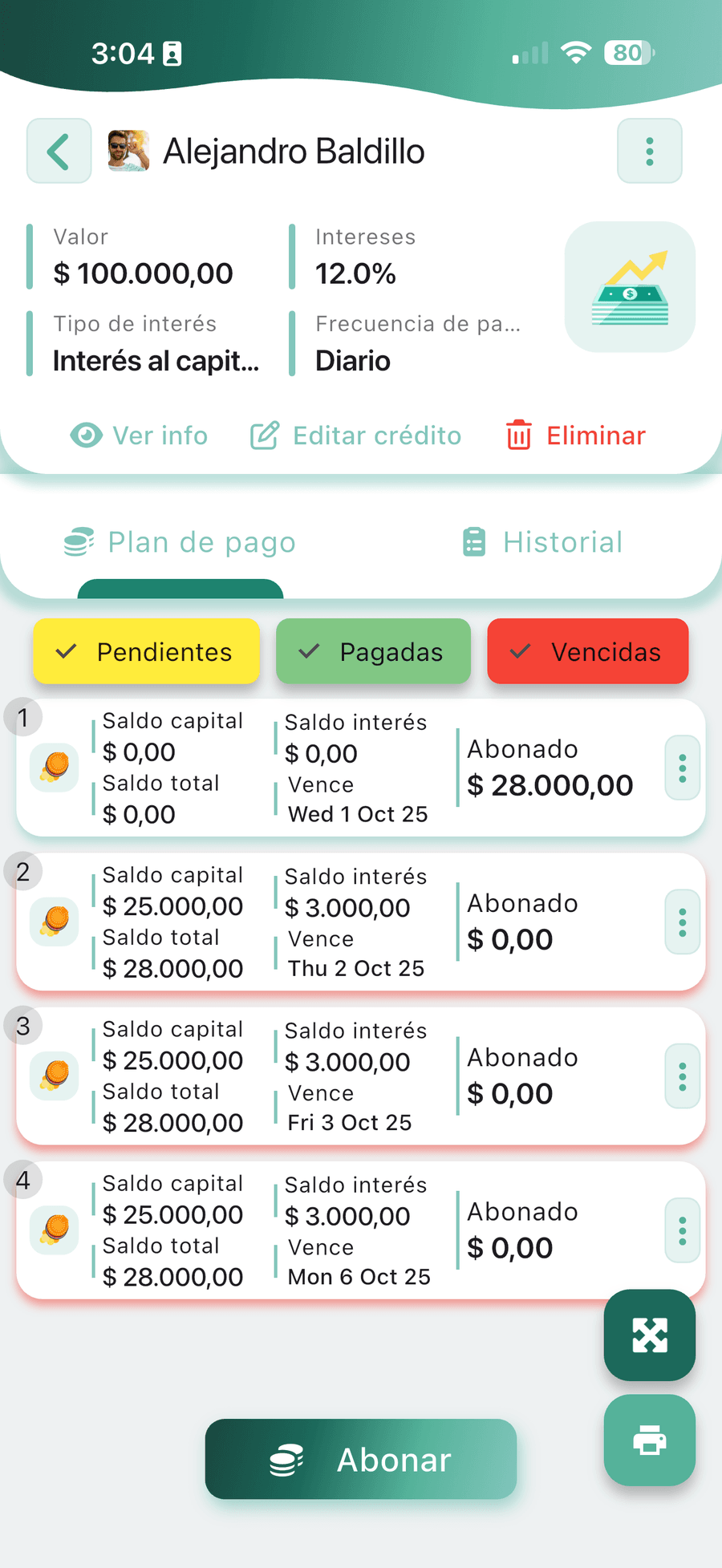
The report your accountant will ask for
This is where the notebook fails completely. In it, the example’s installment goes in as a single line of $60, when it is really two different things: $50 of capital coming back to your pocket and $10 of interest you did earn. To know whether they paid you, the sum is enough. To account for it, it is not: capital coming back is not income, it just changes place. The software makes that split at the moment of payment, not in January with last year’s notebook on the table.
Statement per customer
Every payment with its date, how much went to interest, how much to capital and what balance is left. It is the paper that ends an argument and the detail you check when a figure does not add up.
Interest accrued and interest collected
What the payment plan generated and what actually came in. They are almost never the same figure, and only the second is income for the period.
Disbursements for the period
Which loans you handed out, to whom and on what day. It is the counterpart of the money that went out: without that detail, a large withdrawal has no explanation.
Cash movements for the period
Takings, disbursements and expenses, in date order and one per row. It is what lets you reconcile the cash against the bank without reconstructing the month from memory.
All four come from the same record and download to Excel or CSV, with one row per movement instead of a total at the end. This is loan accounting: what you lent, what came back and what you earned. Reading the live portfolio — how much is out there today and what part has been sitting still — is a different exercise with its own page: daily loan tracking.
In the spreadsheet the installment is a single line: the sum works, the split between interest and capital does not.
No loan is repaid the way you wrote it
The table in the example is perfect. Reality is not. The customer pays half on Tuesday, skips Thursday, turns up on Saturday with two installments and a week later asks to renew the loan with the old balance inside. Every one of those movements shifts the payment plan you built on disbursement day, and the plan has to keep adding up after it moves: the installments left, the interest still to accrue and the date the loan closes.
The four cases that break any spreadsheet are always the same: the partial payment (does it all go to interest or is it split?), early repayment (if the interest is on the balance, paying early should cost less), refinancing (the old balance becomes capital in the new loan) and arrears, which need their own separate reckoning so they do not get confused with running interest.
Loan management software solves all four with a rule written once and applied identically across the portfolio: the payment comes in, the app decides which part pays interest and which part reduces capital, and rebuilds the plan through to the last installment. The loan keeps its full history — what was paid, when, how it was split and what balance is live — and the proof of that movement prints over Bluetooth or goes as a PDF over WhatsApp without leaving the screen.
Administering and collecting do not happen in the same place: the loan is built sitting down and the payment is recorded standing up, at the customer’s door. That is why the web version opens the same portfolio on the computer to set up loans calmly and pull the reports, while the phone keeps recording even with no signal and uploads the backup once it returns. If today you keep everything in a spreadsheet, the collections Excel template marks how far that road goes; and if you also have people collecting on the street, that part is covered by the collections platform.
CobrApp does not grant credit or lend money. It is a technology platform for collections management and portfolio control of loans issued by third parties.
Frequently asked questions about loan management software
What people who already lend ask when they want to get the administration in order.
Does it work as software for monthly installments and daily-payment loans?
Is the 20% on a daily-payment loan monthly or for the whole term?
How is a partial payment split between capital and interest?
Which interest model should I set up for my portfolio?
Is the software any use for handing accounts to my accountant?
How many loans can I administer without paying?
$ 3,470.00 Balanced
What a route of 37 visits with 4 collectors brings in on one day, with the portfolio balanced at close.
Build your first loan in the app and compare the arithmetic
Download CobrApp free, simulate the loan with your own terms and see whether the payment plan matches yours.